A pixel
handheld for
games you make一台
自己做游戏
的掌机
VibePlay is a 240×160 pixel handheld and a set of tools to make games for it. Tell Claude Code or Codex what game you want, and it writes the game. Or write it yourself. Then push it to the handheld, or send a web page to a friend.
VibePlay 是一台 240×160 的像素掌机,和一套做游戏的工具。跟 Claude Code 或 Codex 说要什么游戏,它来写;也可以自己写。写完推到掌机上,或者发一个网页给朋友玩。
Two minutes, from idea to handheld两分钟看完:从想法到掌机
What the handheld is, how an agent makes a game, how you test it, and how it gets onto the handheld. English voice and subtitles.
掌机是什么、agent 怎么做游戏、怎么测、怎么装到掌机上。英文配音和字幕。
One file, three places同一份代码,跑在三个地方
You write the game in Rust and build it into one wasm file. The window on your computer, the browser and the handheld all run that same file. Every pixel and every note is the same.
游戏用 Rust 写,编成一个 wasm 文件。开发机的窗口、浏览器、掌机跑的是同一个文件,画面和声音一个点都不差。
- Computer开发机
vibeplay runopens a window to play开一个窗口玩 - Browser浏览器
vibeplay webone HTML file that anyone can play一个 HTML 文件,发给谁都能玩 - Handheld掌机
vibeplay pushsends it over Wi-Fi and opens it走 Wi-Fi 推过去,直接打开
Four samples to copy from四款样板,拿去抄
Each one is a full game made with these tools. All the code is in the repository. Each one plays like a classic game, but the characters, stages, art and music are new. Click a cartridge to play it in your browser.
每一款都是用这套工具做完的游戏,代码全在仓库里。每一款照一款老游戏的玩法做,角色、关卡、画面、音乐都是新做的。点卡带就在浏览器里玩。
 Skyfire烈空战机Vertical shooter. Four stages, a boss at the end of each.竖版飞机射击,四关,每关最后一个大怪Plays like Raiden玩法像《雷电》
 Gale Courier疾风邮差Side-scrolling platformer. Six stages.横版跳跃,六关Plays like Super Mario Bros.玩法像《超级马力欧兄弟》
 Thunder Strike雷霆突击Run-and-gun. Four stages, pick one of two soldiers.横版射击,四关,两个队员选一个Plays like Contra玩法像《魂斗罗》
 Iron Camp铁壳守营Top-down tank battle. Twenty stages. Keep your camp safe.俯视坦克战,二十关,守住老家Plays like Battle City玩法像《坦克大战》
Recommended推荐做法
Let Claude Code or Codex write it让 Claude Code 或 Codex 写
This is the easy way to make a game. Install the tools and the VibePlay Skill. Then open Claude Code or Codex in an empty folder and say what game you want.
这是做游戏最省事的方法。安装工具和 VibePlay 的 Skill,在一个空目录里打开 Claude Code 或 Codex,说你要什么游戏。
cargo install --git https://github.com/second-state/vibeplay-sdk vibeplay-cli
rustup target add wasm32-unknown-unknown
vibeplay skill install
mkdir cat-run && cd cat-run && claude
Make a VibePlay game. A cat runs on rooftops and jumps over gaps. Three stages, and a boss at the end of the last one. Check each stage with screenshots.
做一款 VibePlay 游戏:小猫在屋顶上跑,跳过空隙。三关,最后一关有个大怪。每一关截图自己查一遍。
The Skill tells the agent how to draw, read the buttons, play notes and save. An agent cannot see a window, so the command line runs without one. The agent plays from a key script, saves screenshots and reads them. Sounds come out as lines of notes. When the picture or the sound is wrong, the agent fixes it. You play the result with vibeplay run.
Skill 告诉 agent 怎么画、怎么读键、怎么发声、怎么存档。agent 看不到窗口,所以命令行能不开窗口跑:它按一段按键脚本玩,存下截图自己看;声音印成一行一行的音调。画面不对、声音不对,它自己改。做完你用 vibeplay run 玩。
Codex works the same way: run codex in place of claude. For other agents, tell them to run vibeplay skill and read it.
Codex 一样:把 claude 换成 codex。别的 agent 让它跑 vibeplay skill,自己读。
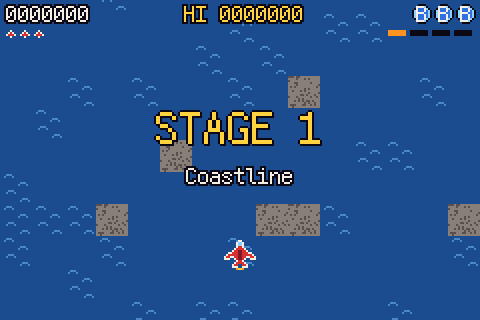
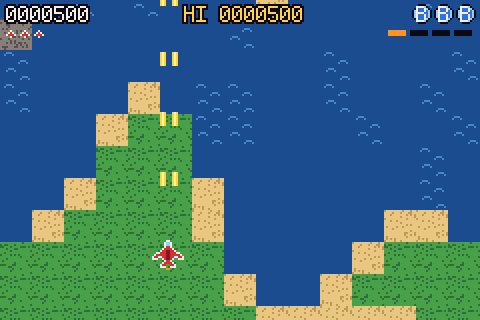
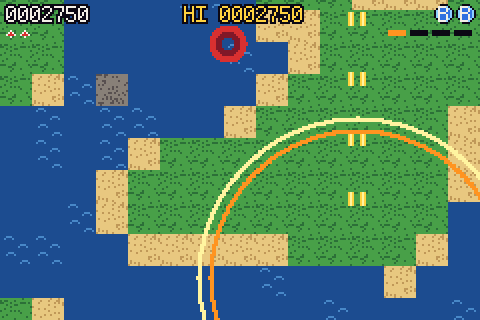
vibeplay shot saves frames 150, 700 and 1620, and the agent reads the images.
agent 按一段按键脚本玩《烈空战机》,vibeplay shot 存下第 150、700、1620 帧,它自己读图看。
Or write it yourself或者自己写
You need Rust. These are the same commands that the agent uses. Five steps take you from the tools to a game on the handheld.
要 Rust。下面是 agent 用的同一套命令,五步从安装工具到在掌机上玩。
-
Install the tools安装工具
The command line, the wasm build target, and the instructions for your agent.
命令行、wasm 的编译目标,再给 agent 安装说明。
cargo install --git https://github.com/second-state/vibeplay-sdk vibeplay-cli rustup target add wasm32-unknown-unknown vibeplay skill install -
Start a game起一个游戏
The template is a small game you can play, Star Catch: a title screen, 30-second rounds, a saved high score and music. Change it into your game.
模板是一款能玩的小游戏《捡星星》:标题、三十秒一局、最高分存档、音乐。在它上面改。
vibeplay new star-catch cd star-catch -
Play it in a window开窗口玩
Arrow keys move, X is A, Z is B, Enter is START. After you change the code, run it again. Add
--lang zhto see the Chinese text.方向键走,X 是 A,Z 是 B,回车是 START。改了代码再跑一次。加
--lang zh看中文的字。vibeplay run -
Make a web version出网页版
One HTML file with the game inside. Open it to play, or put it in your own web page.
一个 HTML 文件,游戏塞在里面。双击就能玩,也能放进你自己的网页。
vibeplay web # dist/star-catch.html -
Push it to the handheld推到掌机
Turn on developer mode on the handheld and pair once. After that, each change is pushed and the handheld swaps it in.
掌机打开开发者模式,配对一次。以后一改就推,掌机上直接换。
vibeplay pair 192.168.1.23
vibeplay push --watch
Put it on the handheld安装到掌机上
Over Wi-Fi走 Wi-Fi
Put the handheld and your computer on the same Wi-Fi. Run vibeplay pair and type the code from the handheld screen. You pair only once.
掌机和电脑在同一个 Wi-Fi 里。vibeplay pair 输入掌机屏幕上的口令,配一次就好。
To connect the handheld to Wi-Fi, you can type the password with the D-pad in Settings. An easier way: put a file named wifi.toml on the TF card, with two lines, ssid = "your network" and password = "...". Put the card in and turn the handheld on.
掌机连 Wi-Fi:可以在设置里用十字键输口令。更省事的办法:在 TF 卡上放一个 wifi.toml,写两行 ssid = "网络名" 和 password = "口令",插上卡开机就连上。
vibeplay push packs the game, sends it and opens it. Push the same game again and the handheld swaps in the new one and keeps the saves. For a new game, the handheld asks once, and it installs only when you press A.
vibeplay push 打包、推过去、直接打开。同一款游戏再推,掌机换上新的,存档留着。新游戏掌机上问一次,你按 A 才安装。
With a TF card插 TF 卡
vibeplay pack makes a .vp file of about 700 KB.
vibeplay pack 出一个 .vp 文件,大约 700 KB。
Copy it into the games folder on a TF card, put the card in and turn the handheld on. The game is installed and shows on the home screen with its cover.
拷进 TF 卡的「游戏」目录(叫 games 也行),插上掌机开机,游戏就安装好了,在主屏上带着封面。
The system on the handheld掌机上的系统
These are screens from the handheld system. English is the default. Change the language in Settings.
这些是掌机系统的界面。默认英文,在设置里能换中文。
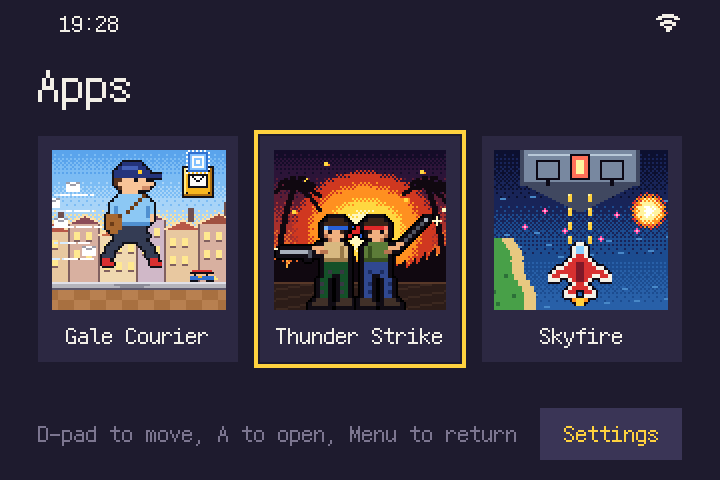
Home: your games, each with its cover. The D-pad picks one, and A opens it.开机就是游戏列表,每款带封面。十字键选,A 打开。
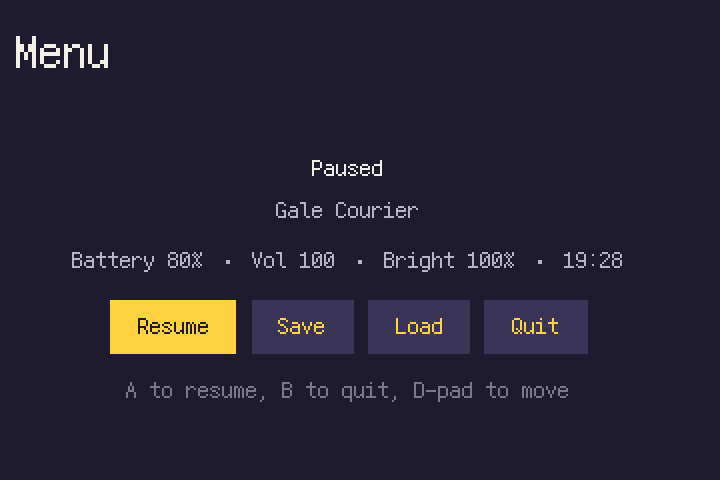
Press the Menu button in a game, and the game stops. Resume, save, load or quit.游戏里按菜单键,游戏停下。接着玩、存档、读档、退出。
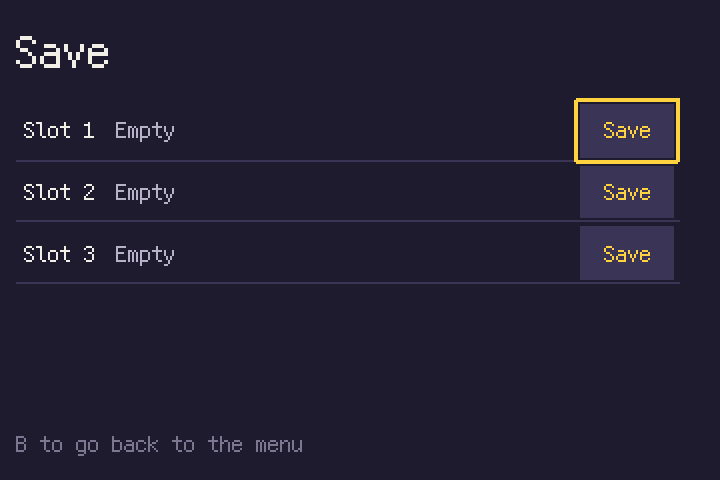
Each game has three save slots. A save keeps the whole game, at any point.每款游戏三个存档格子,随时存下整个游戏。
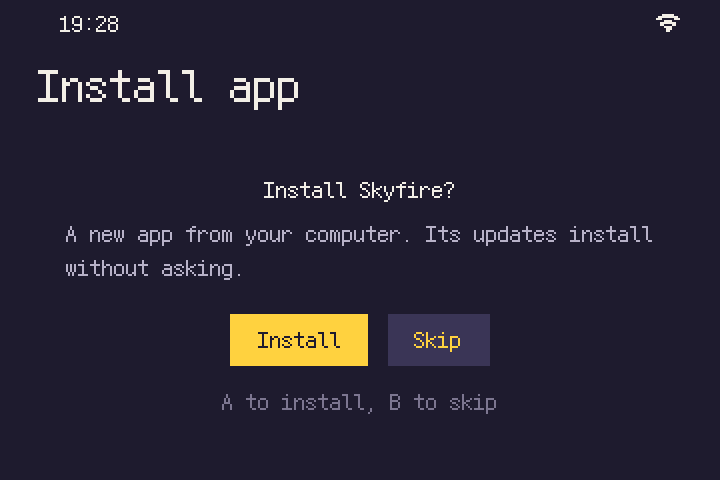
Push a new game from your computer. The handheld asks once before it installs it.从电脑推来新游戏,掌机先问一次,再安装。
What the handheld does掌机能做什么
- CPU处理器
- Allwinner H700, four Arm Cortex-A53 cores at 1.5 GHz全志 H700,4 核 Arm Cortex-A53,1.5 GHz
- GPU
- Mali-G31 MP2
- Memory内存
- 1 GB LPDDR4
- Wireless无线
- Dual-band Wi-Fi, Bluetooth 4.2双频 Wi-Fi,蓝牙 4.2
- Screen画面
- 240×160, 256 colors, 60 frames a second240×160,256 色,每秒 60 帧
- Sound声音
- Two square waves, one triangle wave, one noise channel, and one channel for short recordings两路方波、一路三角波、一路噪声,再加一路短录音
- Buttons按键
- D-pad, A B X Y, L R, START SELECT十字键,A B X Y,L R,START SELECT
- Saves存档
- Games save on their own, and the menu can save and load at any time游戏自己存;菜单里还能随时存档、读档
- Text字
- A built-in 12-pixel font with English and Chinese自带中文和英文的点阵字,12 像素
- Language语言
- English or Chinese, set in Settings. Games follow it英文或中文,在设置里换,游戏跟着换
- System系统
- QingOS. Each game is a full-screen appQingOS,游戏是占整屏的 app
Get a VibePlay买一台 VibePlay
$159 USD
- The handheld, with QingOS and the four sample games installed掌机一台,预装 QingOS 和四款样板游戏
- Developer mode: push your own games over Wi-Fi开发者模式:自己做的游戏走 Wi-Fi 推上去
- A TF card slot for games from friendsTF 卡槽:朋友的游戏插卡就能安装
Orders are not open yet. Check back soon.还没开始卖,过几天再来看看。
Payment is handled by Stripe. You enter your card and shipping address on Stripe's page.付款走 Stripe:卡号和收货地址在 Stripe 的页面上填。